

IT Help Desk
Technology Suite
Simple IT Support Ticketing for K–12
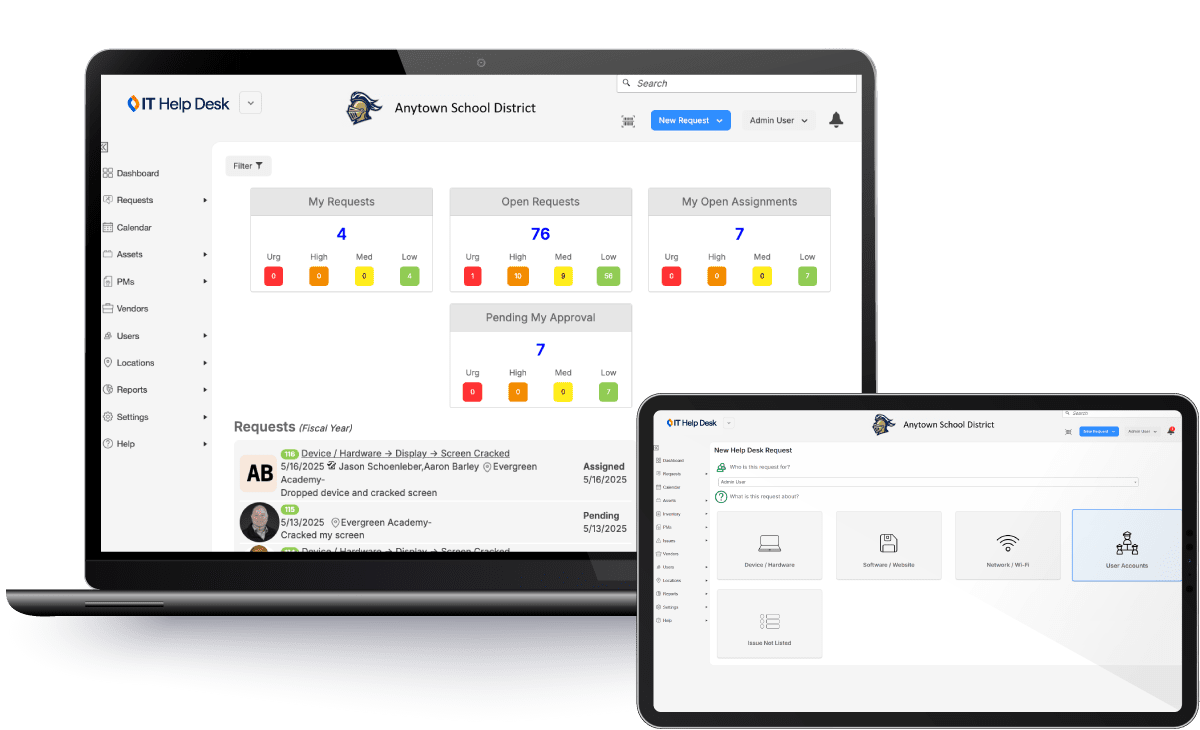
IT Help Desk makes it easy to manage IT support tickets throughout your district. Designed for school districts that need a flexible solution, it centralizes requests, streamlines response times, and gives IT teams clear visibility from submission to resolution. The Technology AI Assistant is built in, bringing automated ticket intake, plain-language data analysis, and policy-grounded guidance to your IT support workflows.

Quick to Deploy
Get up and running fast with an intuitive setup that makes it easy to start managing support requests right away, saving time and money.
Manage Support Requests from Start to Finish
Track and manage IT support requests from submission to resolution. IT Help Desk supports service level agreements (SLAs), maintains a complete audit history, and gives IT teams visibility into ticket status, priorities, and response times.
Track Device-Based and General IT Requests
Manage support requests with the right level of detail. IT Help Desk enables teams to track basic device information and tie tickets to specific devices when needed, while still supporting general requests for technology issues.
Built to grow with you — no matter your size
Whether you’re supporting a single school or an entire district, our flexible platform scales effortlessly to meet your needs today — and tomorrow.
Is IT Help Desk Right for You? Here’s the Breakdown.
Who It’s For
Directors of IT / Technology looking for a lightweight solution that provides visibility into tech issues without needing a full asset management system.
What’s Included
- User Ticket Submission & Email Integration
- SSO Integration
- Customizable Ticket Forms & Categorization
- Email-Based Ticket Management
- SLA Tracking to monitor response and resolution performance
- Interactive Dashboards & Reporting
Looking for one seamless system for complete IT control?
IT Asset Manager combines integrated device management and IT Help Desk into a single, mobile-friendly platform designed for the full scope of K–12 IT operations.
With built-in help desk functionality, districts can manage devices, track issues, and support users as their needs grow.

Key Benefits & Features of IT Help Desk
Key Features For IT/Tech Leaders
- Centralized Ticket Submission
Configure a dedicated email address for staff to submit support tickets. Technology AI Assistant reads each request, categorizes it, and routes it to the right technician automatically, so your team starts every day with a clean, prioritized queue. - Customizable Workflows
Tailor fields, forms, and workflows to match the unique needs of your organization, ensuring relevant data is captured and processed effectively. - Insightful Reporting
Run comprehensive reports on support tickets, or ask Technology AI Assistant about ticket trends in plain language and get answers immediately. - Audit and Accountability
Monitor team performance and efficiency by auditing support ticket workflows and outcomes. - Stakeholder Communication
Configure automated notifications to keep all relevant parties informed throughout the support process. - User and Team Management
Manage access levels and assign tasks to specific service teams to optimize the support process.
Key Benefits For IT/Technology Directors
- Enhanced Device Visibility
Gain real-time insight into devices with outstanding support requests, ongoing repairs, and completed maintenance activities. - Resource Optimization
Streamline IT support processes to maximize resource allocation, reducing unnecessary workload and costs. - Prolonged Device Lifespan
Maintain devices in optimal working condition, reducing waste and avoiding premature replacements. - Data-Driven Decision-Making
Ask Technology AI Assistant questions about support activity in plain language and get instant answers. Identify trends, forecast needs, and make informed decisions faster. - Improved Workflow Management
Control ticket assignment, prioritization, and execution to enhance departmental efficiency. - Minimized Classroom Disruption
Ensure timely repairs to keep technology in the classroom running smoothly, supporting uninterrupted learning.
Follett Software AI · Technology Suite
Your queue, organized before you open it.
Technology AI Assistant works directly within IT Help Desk to automate how requests come in, surface what matters, and keep your team grounded in district policy.
- AI Email Ticketing categorizes, summarizes, and routes support emails automatically
- Ask questions about ticket data in plain language and get instant answers
- Policy document uploads, which let the AI ground responses and routing in your district’s procedures, are coming soon

SSO & Authentication
Manage access through your SSO provider or any provider that supports SAML.


Go beyond devices. Connect IT and Facilities.
Not every ticket starts and ends with a screen. Many depend on HVAC, power, cabling, cameras, and room availability working exactly as they should.
Follett’s Facilities Suite builds on IT Asset Manager with work orders, preventive maintenance, scheduling, and interactive floor plans — so IT and facilities teams can stay aligned around every event, outage, and repair.

Why Trust Follett Software for Your School's IT Management?

Follett Software supports more than 80,700 schools in 137 countries.
For over 150 years, we’ve partnered with educators, technology leaders, and administrators to simplify operations and strengthen learning with technology that meets realities head on.
IT Help Desk is designed to protect your data with role-based access controls, audit trails, and compliance-ready reporting to help reduce risk.
With IT Help Desk, you’re not just getting software. You’re getting a partner who understands the realities of school IT.
Request a demo of IT Help Desk today!
Related Resources

Why K–12 Technology Leaders Belong in Strategic Decisions
Blogs

What’s New in the August 23 Release: Faster Answers for K–12 Technology and Facilities Teams
Blogs

