

K-12 Facility Scheduling Workflows: Requests, approvals, staffing, payments, and reporting in one district process
Facilities Resource
District teams researching facility scheduling are usually not asking whether they need a shared calendar. They are asking whether one system can handle the full workflow behind every request, from intake and approvals to staffing, invoicing, and reporting.

What facility scheduling includes
Facility scheduling in a K-12 district is not just room booking. It is the operating process that connects who is requesting space, what approvals are required, which staff need to be notified, what fees apply, whether conflicts exist, and how leaders report on usage, revenue, and upcoming activity.
The practical question is not whether a calendar can show an event. It is whether the district can run facility use consistently across schools, support teams, and community groups without relying on email chains, manual workarounds, or separate spreadsheets.
At a glance
District buyers usually evaluate this topic across five decision points: request setup, conflict prevention, staff coordination, invoicing, and reporting.
- The harder the district is to coordinate, the more important configurable workflows become.
- Calendar visibility matters, but policy enforcement matters more.
- Payment and fee handling are part of the scheduling workflow, not a separate finance task.
- Reporting becomes more valuable when districts need to explain facility use, staffing demand, and revenue to leadership.
The Core Answer: What Facility Scheduling Actually Includes
Facility scheduling in a K-12 district is not just room booking. It is the operating process that connects who is requesting space, what approvals are required, which staff need to be notified, what fees apply, whether conflicts exist, and how leaders report on usage, revenue, and upcoming activity.
The practical question is not whether a calendar can show an event. It is whether the district can run facility use consistently across schools, support teams, and community groups without relying on email chains, manual workarounds, or separate spreadsheets.
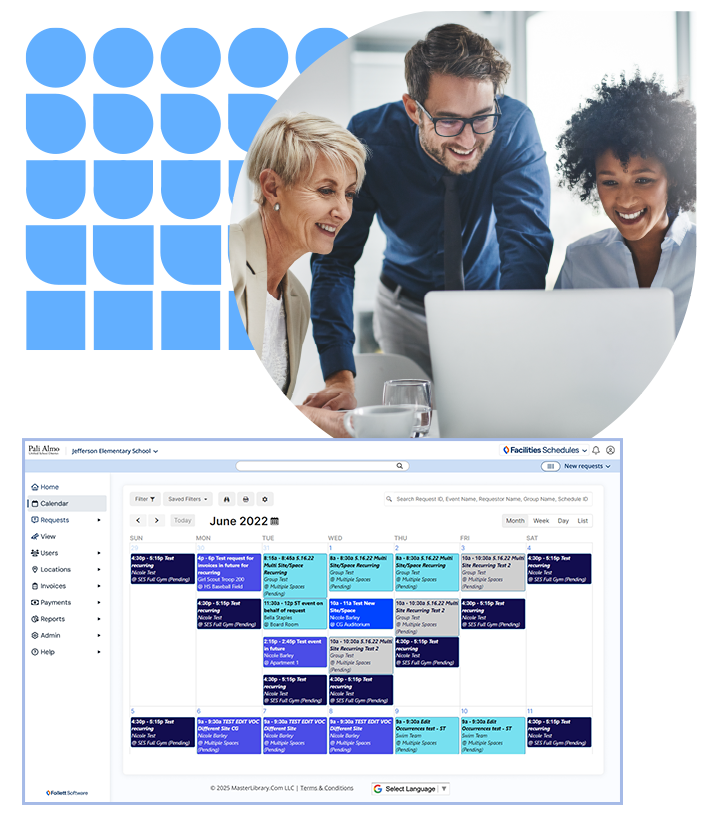
See how Facilities Schedules brings this together
If your team is moving from topic research to product evaluation, start with Facilities Schedules. That page shows how Follett Software handles requests, approvals, staffing, payments, and reporting in one K-12 scheduling workflow.
View Facilities SchedulesWhat This Looks Like in Real District Workflows
The Operational Problem
Districts use facility scheduling software to standardize a process that often varies by building, requester type, and event type. A gym request from an outside community group does not follow the same path as an internal classroom meeting.

Different request forms for different spaces
A district creates different request forms for an auditorium, a classroom, or an athletic field — with required fields and dependent fields based on what the requester selects. An auditorium request may prompt for sound or microphone needs; a field request for setup crew and lighting.

Preventing double booking across the district
A district prevents double booking by blocking conflicting requests entirely, letting approvers decide between pending requests, or allowing certain administrators to override conflicts when policy allows. Staff are automatically notified based on location, event type, or assigned services.

Payments and invoicing inside the scheduling process
A district invoices before approval, after the event, or with a required deposit — while tracking outstanding balances and overdue groups. Fee schedules apply by group type or day, and payment app integrations keep the financial workflow connected to the scheduling record.
The five operational decisions district teams work through
What Buyers Are Really Deciding On
District buyers usually narrow this topic down to a small set of operational decisions.
How configurable does the request process need to be?
Many districts do not need one generic request form. They need different forms, required fields, and fee schedules based on the facility, the requester, and the services tied to the event.
How should the district handle conflicts?
Some districts want a strict first-come, first-served model. Others want overlapping requests to stay open until an approver decides. The right answer usually depends on policy, staffing, and how often high-demand spaces are contested.
How much staff coordination should happen automatically?
This is where districts start separating basic calendar tools from facility scheduling systems. If events require custodial setup, technology support, security, or athletic oversight, staff notification and assignment rules quickly become a core requirement.
Does the district need payment and invoicing inside the same workflow?
For districts serving outside groups, this is often a deciding factor. Scheduling becomes harder to manage when invoices, deposits, payment status, and overdue holds are handled outside the scheduling process.
Will reporting support real operating decisions?
Usage reports, revenue reports, and calendar visibility are not just administrative extras. They help districts understand demand, justify staffing, and explain how buildings are being used.
What the product evidence shows
The current Facilities Schedules capability set supports several of the specific workflows buyers usually research on this topic.
- Custom request forms can be configured by space, with required fields, dependent fields, and space-specific details such as photos, drawings, and room setup diagrams.
- Conflict management supports multiple district approaches, including strict blocking, approver review of competing requests, and administrator permission to double book when policy allows it.
- Staff coordination can be automated based on location, request-form answers, or event assignment, with daily email reporting for staff who need visibility without logging in.
- Payment and invoicing workflows include approval-triggered invoicing, post-event invoicing, fee schedules by group type or day, optional deposits, overdue holds, and payment app integrations.
- Reporting and administration tools include usage reporting, revenue reporting, mass cancellations, blocked dates, future booking limits, and group announcements.

How to evaluate this workflow

Map
Map your approval rules by space type before you evaluate software. The product should reflect your policy, not force a single workflow.
Decide
Decide whether your district needs strict conflict blocking or an approver-led conflict review model.
Treat
Treat staffing notifications as part of the scheduling process, especially if events regularly involve custodial, technology, or athletic support.
Include
Include invoicing, deposits, overdue holds, and revenue reporting in the evaluation if outside groups use district spaces.
Ask
Ask how the system handles mass cancellations, blocked dates, and future booking limits before peak scheduling seasons hit.

See the full product workflow
If these are the capabilities your district needs to evaluate, explore Facilities Schedules to see how the workflow fits together in one system.
View Facilities SchedulesFAQs
-
Most districts do it by combining shared calendar visibility with booking rules. The more mature approach is not just showing the calendar. It is enforcing policy through submission rules, approval workflows, and conflict reporting.
-
They usually need request forms that change by space type. An auditorium request may need sound or microphone details, while a classroom request may not. That is why configurable forms and dependent fields matter.
-
The strongest workflows notify staff automatically based on the location requested, the services selected, or the assignment tied to the event. That reduces the need for manual follow-up and separate email chains.
-
Many districts want invoicing inside the scheduling workflow so they can apply fee schedules, request deposits, track outstanding balances, and restrict new reservations when invoices are overdue.
-
They usually need bulk actions for cancellations, blocked dates, future booking limits, and system-wide announcements. This becomes especially important during weather events, construction closures, or policy changes.
Why districts move beyond shared calendars
Facility scheduling becomes a more serious district workflow when the challenge is no longer just putting events on a calendar. The real work is coordinating policies, people, payments, conflicts, and reporting in one repeatable process. For districts researching that problem, the next step is to review how Facilities Schedules handles it in practice.
View Facilities Schedules