
Transforming K-12 Education
Guides
K-12 IT Asset Management and Help Desk Software for Schools: A Smarter Way to Manage Devices, Requests, and District Operations
School districts need more than disconnected tools to support modern learning. They need K-12 IT asset management and IT help desk ticketing systems that work together, so teams can track devices, resolve issues faster, and keep students and staff supported without adding more manual work. Follett Software’s current technology positioning reflects that shift: IT Asset Manager now connects asset tracking, help desk workflows, and AI-powered ticket automation in one system built specifically for K-12 IT operations.
 For district leaders, that matters because device support is no longer just about inventory. It is about service request management, lifecycle visibility, technician efficiency, and better decisions across the district. Follett’s current platform messaging emphasizes a centralized K-12 IT management dashboard, ticketing built into every asset, mobile workflows for field technicians, and district-wide visibility into devices, sites, and open tickets.
Why school districts are rethinking IT help desk ticketing systems
Many districts still rely on a mix of inboxes, spreadsheets, standalone forms, and disconnected tools to manage support. That makes it harder to see the full history of a device, identify repeat issues, and understand what is driving ticket volume across schools. Follett’s current messaging for K-12 technology leaders positions a unified platform as the alternative to those silos, bringing asset management, service history, support workflows, and district reporting into one place.
That unified approach is increasingly important because K-12 IT teams are being asked to do more with fewer people. Follett’s IT Help Desk and IT Asset Manager positioning both focus on reducing manual work through centralized ticket submission, automated routing, reporting, and mobile-friendly access for technicians working across campuses.
What modern K-12 IT asset management should include
A strong K12 IT asset management strategy should cover the full device lifecycle, from procurement and assignment to repair, transfer, and retirement. Follett’s live IT Asset Manager page now emphasizes complete lifecycle visibility, with every repair, ticket, and assignment tied to the device record so IT teams can see full history in one click.
Current product details also highlight features school district technology leaders expect from modern IT asset management software, including:
- 2-way MDM sync with Google, Jamf, Intune, and Mosyle.
- Built-in ticketing directly connected to asset records.
- Mobile access for field technicians to scan barcodes, update tickets, and circulate devices from a phone.
- AI-assisted ticket intake, summarization, and routing to reduce time spent sorting email.
These capabilities help districts move beyond basic school district asset tracking and toward a more operational model, where device data and service workflows support faster decisions, better accountability, and fewer interruptions for classrooms.
How unified service desk tools improve service request management
The best unified service desk tools do not treat tickets and assets as separate workflows. They connect the issue, the device, the user, and the technician action in one system. Follett’s internal enablement materials position IT Asset Manager as a purpose-built solution for K-12 IT operations that unifies asset management and help desk ticketing into a single experience, with real-time visibility into device health, tickets, and fleet status.
That matters when districts are evaluating IT implementation challenges such as disconnected systems, limited staff time, and poor asset visibility. Follett’s internal comparison materials show that IT Asset Manager adds inventory management, parts management, shared reports and views, SIS integration, and two-way MDM integrations while maintaining core ticketing features such as request routing, email-to-ticket creation, labor cost tracking, and barcode workflows.
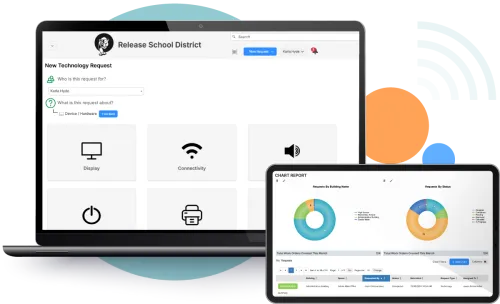 For districts comparing platforms, that is an important distinction in any ticketing system comparison: a lightweight help desk can improve intake and visibility, but deeper K-12 IT asset management creates stronger lifecycle control and better long-term reporting.
Why IT and facilities integration is becoming a bigger priority
In many districts, service request management does not stop with student devices. Classroom uptime also depends on power, HVAC, cabling, room readiness, and building conditions. Follett’s current product language explicitly connects IT and facilities integration by positioning the Facilities Suite as an extension of IT Asset Manager, with Work Orders, preventive maintenance, scheduling, and interactive floor plans that help IT and facilities teams stay aligned around events, outages, and repairs.
That makes this more than an IT help desk conversation. For K-12 leaders searching for facilities management software, unified service desk tools, or K-12 service desk options for IT and facilities, the stronger message is operational coordination. Internal feature documentation shows that maintenance request types live in Work Orders, while IT Help Desk and IT Asset Manager support technology request types. Together, those tools give districts a clearer path to cross-functional workflows without forcing everything into a one-size-fits-all ticket queue.
Overcoming common implementation challenges in educational institution IT
One of the biggest educational institution IT challenges is adoption. Districts need software that is practical to launch, flexible enough to fit current workflows, and scalable enough to grow over time.
Follett’s current IT Help Desk positioning highlights fast deployment, intuitive setup, customizable forms and categorization, SLA tracking, email-based ticket management, and interactive dashboards and reporting.
For districts that need deeper functionality, IT Asset Manager extends that foundation with broader lifecycle management, asset and ticket integration, and AI-enabled support workflows. Current live messaging also highlights planned and active AI capabilities such as device usage insights, predictive maintenance alerts, purchasing recommendations, auto-population of asset records, and automation for routine support and task routing.
This is especially relevant for school districts trying to solve K12 education technology challenges without adding another disconnected point solution. Follett’s technology suite messaging frames IT Asset Manager as one connected platform that centralizes asset tracking, circulation, repair management, reporting, and IT Help Desk for unified support and faster resolution.
The operational payoff for school districts
Follett’s current public messaging puts measurable outcomes behind this approach. The live IT Asset Manager page cites a 30% reduction in maintenance costs and 20–40% faster ticket resolution, while also noting that districts using IT asset management with barcode scanning and accountability workflows report a 20–30% reduction in lost or misplaced devices.
 The benefit is not just efficiency for the IT department. It is better district-wide visibility, fewer unnecessary purchases, stronger audit readiness, and more reliable access to classroom technology. Follett’s current summary language states that K-12 IT asset management gives districts full visibility into device lifecycle, reduces financial risk, simplifies audits, and protects technology investments.
A smarter path forward for K-12 districts
If your district is evaluating IT help desk ticketing systems, K12 IT asset management software, or a more unified approach to service request management, the real question is not whether you need better ticketing. It is whether your technology and facilities workflows can work together with enough visibility, automation, and lifecycle context to support the whole district.
Follett Software’s current positioning makes that answer clearer than it was a year ago. IT Asset Manager is now positioned as the central K-12 platform for asset tracking, help desk workflows, AI-powered support, and district-wide operational insight, while IT Help Desk serves districts that need a simpler standalone starting point for support ticket management.
See how Follett can unify asset management and support
Ready to improve device visibility, reduce manual work, and create a stronger system for K-12 IT and facilities coordination? Explore IT Asset Manager to see how Follett connects asset tracking, help desk workflows, and AI-powered support in one K-12 solution, or request a demo to see how it could work in your district.
Related Resources

The K–12 School Library Planning Calendar
Guides

The State of K-12 Facilities: 2026 Benchmarks
White Papers

The Follett Software Advantage Guide
Guides