
School Work Order Software: How to Manage Work Orders and Facility Use Requests in a School District
Blogs
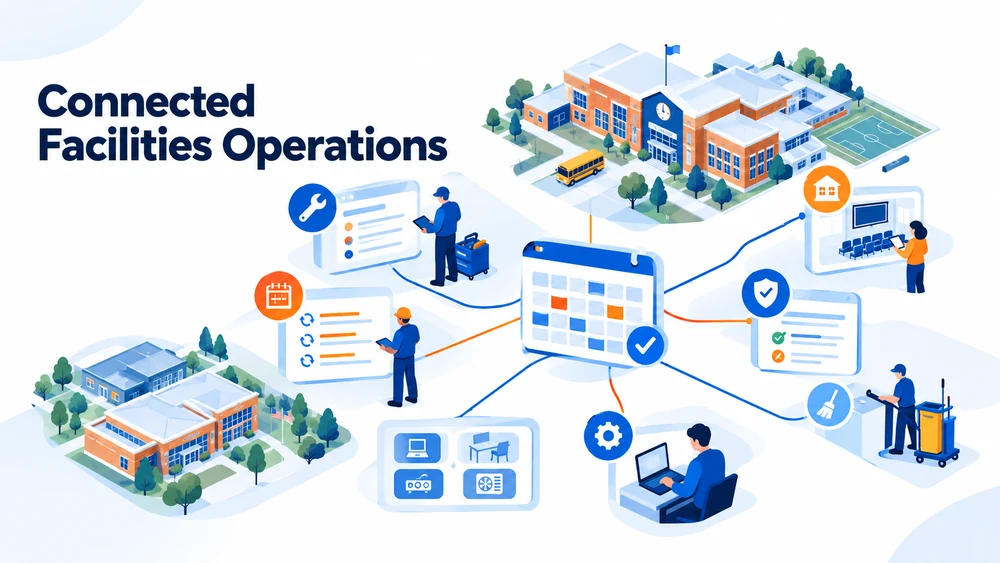 School work order software helps districts organize maintenance requests, route work to the right team, and track progress from intake through completion.
When a district also manages facility-use requests, the same operating picture should connect the request for space with the work needed to prepare and support that space. That connection matters because a facility request is rarely just a calendar entry. An event may require custodial coverage, room setup, technology support, safety checks, or follow-up work.
A connected process gives facilities and operations teams one clearer way to manage what was requested, what was approved, what needs to happen, and what is complete.
What is school work order software?
School work order software is a facilities operations system for managing maintenance and custodial work across district buildings.
A strong workflow can help teams:
- Give staff a consistent way to submit requests.
- Route work by building, request type, approval need, or assigned team.
- Track status from submission through completion.
- Connect work to buildings, rooms, assets, photos, procedures, parts, and service history.
- Manage recurring and preventive maintenance.
- Report on workload, costs, recurring issues, and completed work.
The value is not just capturing a ticket. It is turning a request into organized, actionable work with enough context for coordinators, technicians, custodians, requestors, and district leaders to stay aligned.
How do K–12 districts manage maintenance work orders?
Districts manage maintenance work more consistently when they build a repeatable workflow around five connected steps.
1. Capture requests in one place
Requests often arrive by phone call, email, paper form, or hallway conversation. That makes it difficult to see the full workload or know whether a request has already been submitted.
A consistent intake process gives requestors a clear way to describe the issue and gives coordinators a shared queue to review.
2. Route work with the right context
A request should reach the appropriate person or department with the details needed to act. Routing can reflect the building, issue type, approval requirements, priority, or other district-defined rules.
The goal is to reduce manual follow-up before the work can begin.
3. Keep requestors and teams informed
Status visibility helps requestors understand what is happening and helps facilities leaders see what is open, assigned, overdue, or complete. Notifications can keep the right people informed without requiring someone to send a separate update for every change.
4. Connect work to assets and recurring maintenance
Work orders become more useful when they retain the history of the asset, location, materials, photos, procedures, and prior service activity. That context supports preventive maintenance and helps teams recognize recurring problems before they become larger disruptions.
5. Use the record for planning
A durable work history helps facilities leaders review workload, labor, materials, costs, risks, and recurring issues across buildings. That information can support staffing conversations, maintenance planning, budget requests, and longer-term capital decisions.
How should facility-use requests fit into the workflow?
Facility use request software should connect the request for space with the district’s rules, approvals, schedule, support needs, and status.
A typical facility-use workflow includes:
-
Collecting the event, group, location, date, time, and support details.
-
Checking availability and potential conflicts.
-
Routing the request for the right approvals.
-
Notifying custodial, facilities, technology, or other support staff.
-
Tracking fees, invoices, or payment status where applicable.
-
Recording the final booking and related follow-up work.
Facilities Schedules is designed to manage facility-use requests, availability and conflict checks, approvals, staff coordination, invoicing, payment tracking, and reporting in one workflow.
Where Facilities Schedules and Work Orders are both in place, a reservation can connect to related support or maintenance work.
How do work orders and facility-use requests work together?
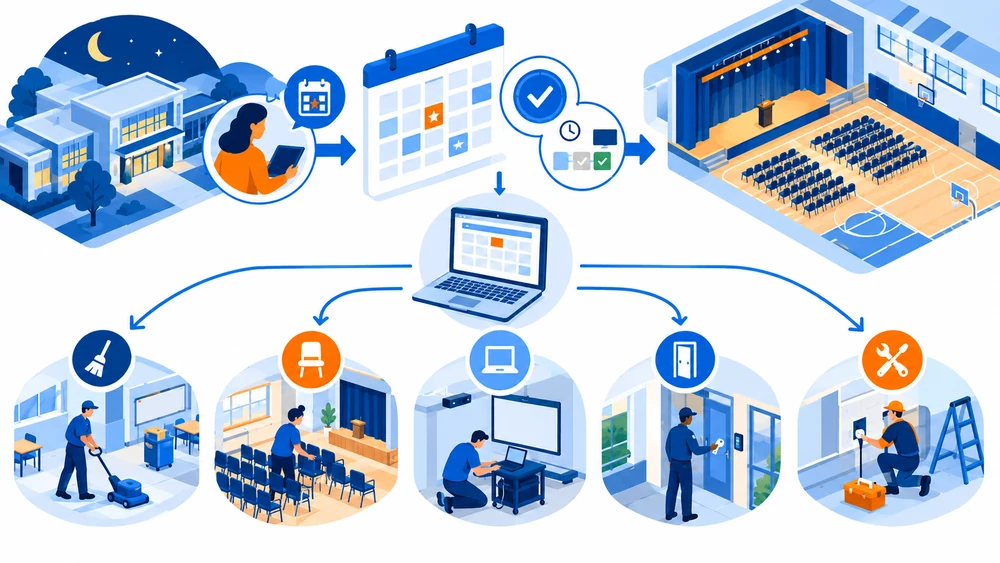 The connection is easiest to understand through a common district scenario.
A community organization requests a gym for an evening event. The district reviews the request, checks the calendar, applies its approval rules, confirms any fees, and approves the reservation.
The event details then reach the staff responsible for setup, access, custodial coverage, or technology support. If a maintenance or setup task is needed, the work can be tracked instead of being left in an email thread or hallway conversation.
The same pattern applies to internal events, athletics, performances, meetings, and other uses of district space.
The facility-use process answers, “Can this request be approved and scheduled?” The work-order process answers, “What needs to happen to prepare, support, or maintain the space?” Together, those workflows help facilities teams coordinate the building before an issue becomes an emergency.
The problems nobody sees become emergencies everyone feels; connected requests and work records give teams a better chance to see the work earlier.
What should districts look for in school facilities management software?
When evaluating school facilities management software, look for a system that reflects the way district work actually moves across buildings and roles.
- One intake process for maintenance, custodial, and facility-use requests.
- Configurable forms, routing, approval, and conflict rules.
- Shared visibility into buildings, spaces, assets, schedules, and work status.
- Connections between facility reservations and support or maintenance tasks.
- Preventive maintenance and recurring-work capabilities.
- Mobile or web access for teams working in the field.
- Reporting on workload, status, labor, materials, costs, and recurring issues.
- A clear system of record that reduces dependence on paper, email, and disconnected calendars.
Core scheduling and work-order features are common across the market. The more useful question is whether the system gives your district a connected operating view across requests, spaces, people, assets, and work.
How does Follett support connected facilities operations?
Follett Facilities Suite gives K–12 districts a connected set of tools for facility use, maintenance, assets, and related operations.
Work Orders centralizes maintenance work and connects requests with routing, preventive maintenance, asset and inventory context, field execution, and reporting. Facilities Schedules supports the facility-use process from request through approval and coordination.
This approach helps district teams move from reactive coordination toward more visible, consistent, and accountable facilities operations. It also gives districts a path to connect facilities work with technology operations when that broader view is useful.
For the technology side of district operations, read How School Districts Track Chromebooks and Devices.
Frequently asked questions about school work order software
What is the difference between work order software and a help desk?
A help desk typically manages support requests and service communication. Work order software is designed for facilities and maintenance workflows, including buildings, assets, preventive maintenance, labor, materials, field work, and completion records. Some districts connect technology and facilities workflows while keeping the operating needs of each team distinct.
What is facility-use request software?
Facility-use request software helps districts manage requests to use school spaces. It can support availability checks, conflict rules, approvals, staff coordination, fees, invoices, payment status, and reporting according to the district’s process.
How can districts reduce double-booked spaces?
Districts can reduce double bookings by using one shared view of availability and applying consistent conflict and approval rules before a reservation is confirmed. The right rules depend on the district’s policies and operating model.
Can a facility-use request create related maintenance work?
Where the district has connected scheduling and work-order workflows, a reservation can provide the context needed to coordinate setup, custodial coverage, technology support, or other maintenance tasks. The exact workflow depends on the products and configuration in use.
What should a district track in a work order?
A work order should contain enough information for the assigned team to act, such as the location, issue, priority, requestor, status, related asset, photos or documents, assigned staff, work history, materials, and completion details.
A better facilities workflow does not make the work disappear. It helps the people doing the work see it, coordinate it, and document it before small issues become bigger ones.
Related Product

Related Resources
K-12 Facility Scheduling Workflows
Blogs
What Is K-12 IT Asset Management?
Blogs

How to Run a K-12 Library with Limited Staff
Blogs