
IT Command Center. Stop Chasing Devices. Start Defending Budgets.
IT Asset Manager + Help Desk + Follett Software AI
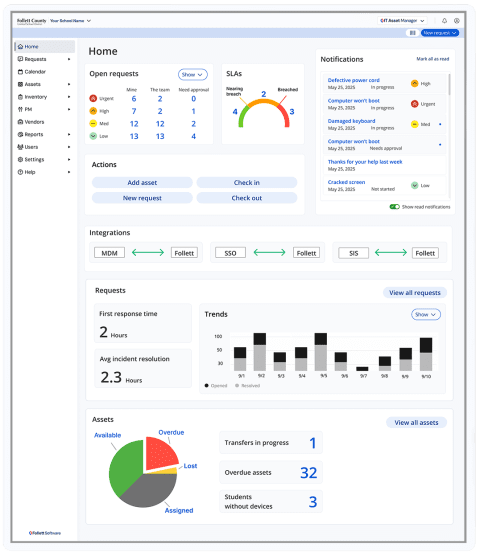
The only K-12 platform with a unified Command Center, built-in Help Desk, and AI that lives inside the work your team already does. One view. Every device. Every ticket. Every dollar.
-
151M+
assets managed on Follett
-
20-30%
fewer lost devices
-
$50K+
saved annually on duplicate purchases
-
90
seconds full operational view every morning
Built for K-12 IT teams running more devices than staff
Who is this for
Small teams. Thousands of devices. Constant board scrutiny. This is the platform built for that reality.

IT Director / Technology Director
You manage thousands of devices with a team of two or three. You need one system that shows you everything, handles tickets, and gives you board-ready data without a half-day data pull.
IT Technician / Support Staff
You are the one getting the calls, walking the buildings, and closing the tickets. You need a system that routes work intelligently, tracks every device, and stops you from toggling between four tools to answer one question.
District Technology Coordinator
You bridge IT and district leadership. You need utilization data, compliance reporting, and a platform that makes the technology investment defensible at the board level.
Superintendent
You need to know the district’s technology investment is protected, defensible, and not creating compliance risk. One trusted platform from a partner already in your buildings.
CFO / Finance
You need total cost of ownership data per device, duplicate purchase detection, and audit-ready asset records that hold up to state and federal scrutiny.
CTO / Privacy Officer
You need FERPA and COPPA compliance built in, AI grounded in district policy, and a platform that integrates with your existing MDM without replacing it.
Most K-12 IT teams are running on disconnected tools and reactive support.
THE OPERATIONAL REALITY
The result is the same everywhere: lost devices, slower response, and budgets that cannot be defended.
Disconnected Systems
MDM, ticketing, asset data, and SIS live in separate tools with no shared view of operations. Answering one question means logging into four systems.
Lost and Misplaced Devices
20 to 30% of district devices go missing each year. At $300 to $1,000 per device, that is $75K to $300K walking out the door annually in a mid-size district.
Manual Workflows
Check-in and check-out by spreadsheet. Support tickets by email. Reports pulled by hand. Every manual step is a minute not spent on the work that actually matters.
Staffing Pressure
Two technicians supporting 3,000+ devices across multiple buildings. Burnout is real. Recruiting is harder. The answer is not more staff. It is smarter tools.
Reactive Support
Firefighting, not planning. Emergency repairs cost more and disrupt classrooms. Without lifecycle data, every replacement is a surprise budget hit instead of a planned line item.
Compliance Risk
Audits scramble for asset records. Missing devices create gaps in state reporting. Without a real system of record, every compliance conversation is a fire drill.
Other platforms make you stitch the pieces together. This is already one system.
WHAT MAKES THIS DIFFERENT
IT Asset Manager includes the Command Center, Help Desk, and AI in a single deployment. No integration projects. No separate contracts. No tool-switching to answer one question.
The Command Center Advantage
Assets, tickets, and AI. In one 90-second view. Competitors sell asset management and ticketing as separate products that talk to each other sometimes. IT Asset Manager ships them as one. That difference is measurable every morning.

IT Asset Manager
Real-time visibility into every device. From first scan to end of life. Know what you have, where it is, and what it costs.
- Asset tracking with barcode scanning
- 275+ asset types, bulk operations
- 2-way MDM sync: Jamf, Intune, Google Workspace, Mosyle
- 64+ SSO and SIS integrations
- Total cost of ownership per device
- Lifecycle and replacement forecasting
- Mobile app for techs and staff
Help Desk
Built In
Not integrated. Not an add-on. Help Desk is part of the same platform, sharing the same asset data so every ticket knows the device it is about.
- Smart routing and SLA management
- Ticket creation via email, web, or mobile
- Asset-linked ticket history
- Calendar integration: Google and Outlook two-way sync
- Workload distribution dashboards
- Parent and staff-facing ticket portal
Technology AI Assistant
Built In
AI that lives inside the tickets, dashboards, and emails your team already uses. Policy-aware. Grounded in your data. No new tool to learn.
- Technology AI Assistant: plain-English answers from your data
- AI Email-to-Ticket Agent: auto-triage and route every support email
- Duplicate purchase detection ($50K+ saved annually)
- Policy-aware grounding: upload your district procedures
- Lifecycle risk flagging before it becomes a crisis
- FERPA and COPPA guardrails built in
Budget defense, operational speed, and board-ready proof.
These are the outcomes IT directors report after moving to a unified command center.
30%
Reduction in Maintenance Costs: Fewer emergency repairs, reduced duplicate purchases, and better inventory oversight.
20 to 30%
Fewer Lost Devices: Real-time tracking, barcode scanning, and check-in/check-out accountability.
15 min
Back Every Morning: Command Center replaces tab-switching with a single 90-second operational view.
20 to 40%
Faster Ticket Resolution: AI Email-to-Ticket Agent extracts, categorizes, and routes automatically.
$50K+
Saved Annually on Duplicate Purchases: AI flags duplicates before they process. Audit-Ready on Demand: Asset records, lifecycle data, and usage reports export in minutes.
AI built into your district's IT workflows.
Technology AI Assistant
Smarter insights. Policy-aware. In the work your team already does. Not AI bolted on. AI built in.
Three Pillars of AI in IT Asset Manager
Smarter Insights
Predict device needs, flag lifecycle risk, and spot cost trends before they become crises. AI helps districts get ahead of problems, not chase them.
In the Work, Not on Top of It
AI lives inside the tickets, dashboards, and emails your team already uses. No new tool to learn. No technical expertise required.
Grounded in Your District
Your policies, your data, your way of working. Upload district procedures so AI reflects how your team operates. Built with FERPA and COPPA guardrails.
What Is Live in IT Asset Manager
Technology AI Assistant
Ask plain-English questions. Get answers grounded in your district’s device and ticket data.
AI Email-to-Ticket Agent
Every support email extracted, categorized, and routed automatically. Triage becomes instant.
Policy-Aware Grounding
Upload your district procedures. AI reflects your way of working, not a generic model.
Duplicate Purchase Detection
AI flags duplicates before they process. $50K+ saved annually in districts with poor asset visibility.
Lifecycle Risk Flagging
Identify aging devices and forecast replacement needs before they become emergency budget requests.
FERPA compliant | COPPA guardrails | Grounded in your data | Student data never used for training
Built for the reality K-12 IT teams actually live in.
Having a centralized spot for tickets and assets has already been a major improvement. I would recommend IT Asset Manager. The interface is very customizable, it is easy to import existing data, and the Implementation Team was helpful and responsive throughout each step.
Assistant Director of Technology, Holden R-3 School District
- 151M+ assets managed on the Follett platform
- 275+ asset types supported with bulk operations
- 64+ integrations with SSO, SIS, and MDM platforms
- 97% customer renewal rate. 97.5% of support calls answered live.
What a stitched-together stack costs you versus a unified Command Center
The cost of disconnected tools is not just the licensing. It is the time, the errors, and the answers you cannot give your board.
Platform Comparison
Funding pathways your CFO will recognize
BUDGET AND FUNDING
IT Asset Manager qualifies for multiple federal and state funding sources. Your finance team has established options.
E-rate Category 2
IT Asset Manager qualifies for E-rate Category 2 funding as an internal connections and managed services platform. Eligibility depends on district-specific E-rate applications and FCC program rules.
Verify eligibility with your E-rate coordinator or district technology director.
Title IV-A
Technology platforms supporting district operations and student access qualify under Title IV-A. Funds are flexible and available to nearly every district receiving federal funding.
Wisconsin Computer Sciences for the Future (CSF)
DEADLINE: June 30 — Funds not designated by June 30 are forfeited for the year
Wisconsin districts must designate unspent CSF funds by June 30. Technology management platforms, including IT Asset Manager, qualify. Wisconsin districts only.
TCO Note for CFOs
Most districts are already paying for asset tracking, ticketing, and AI tools separately. IT Asset Manager consolidates those costs onto one platform, with one contract, one support team, and one renewal cycle. The total cost of ownership typically goes down, not up.
What your approvers need to hear
INTERNAL ALIGNMENT
This is a multi-stakeholder decision. Here is how to frame IT Asset Manager for each person in the room.
IT Director / Technology Director
One Command Center replaces four tools. Your team gets a 90-second view of the full operation every morning. AI handles email triage. Lifecycle data turns surprise budget hits into planned requests. You stop reacting and start managing.
Superintendent
The district’s technology investment is tracked, defensible, and audit-ready. When the board asks how many devices the district owns and what they cost, your IT team answers in minutes, not days. One trusted partner already in your buildings.
CFO / Finance
Total cost of ownership data per device is built in. AI flags duplicate purchase orders before they process. Audit-ready asset records export in minutes. This consolidates tools your district is likely already paying for separately, with a lower combined cost.
CTO / Privacy Officer
The Technology AI Assistant is built with FERPA and COPPA guardrails. AI is grounded in your district data and procedures, not a generic model. 2-way MDM sync with Jamf, Intune, Google, and Mosyle. No rip-and-replace. IT Asset Manager extends what you already have.
A practical conversation. A fast path to full command.
What happens next
No pressure. No obligation. Just a look at whether IT Asset Manager fits the reality your team lives in every day.

Discovery Call
30 minutes. We map your current tool stack, device count, and team structure. This is a diagnostic, not a demo.
Command Center Walkthrough
We walk through IT Asset Manager in the context of your district. Real scenarios, real data workflows, real AI examples.
Budget and Approval
Your Follett partner provides TCO documentation, funding pathway options, and board-ready ROI language for your approval chain.
Live in 30 Days
No migration. Connect to your existing MDM and SIS. Most districts reach full operational impact within 30 days of go-live.
Answers for the people who need to say yes
-
Help Desk is built into IT Asset Manager, not sold separately. Every deployment includes the Command Center, Help Desk with smart routing and SLAs, and the Technology AI Assistant. You do not need to integrate a ticketing system. It is already there, sharing the same asset data from day one.
-
The Technology AI Assistant lives inside the tickets, dashboards, and emails your team already uses. It answers plain-English questions from your actual district data, auto-triages support emails, detects duplicate purchases, and flags lifecycle risk. No new tool to learn. No prompt engineering required.
-
No. IT Asset Manager runs alongside your MDM, not instead of it. 2-way sync with Jamf, Intune, Google Workspace, and Mosyle keeps your asset records current without replacing the MDM tools your team already knows. You add visibility, accountability, and AI on top of what already works.
-
The Technology AI Assistant is built with FERPA and COPPA guardrails. It is grounded in your district’s data and policies, not trained on generic consumer data. Your district uploads its own procedures so AI reflects how your team operates.
-
Yes. IT Asset Manager qualifies for E-rate Category 2 and Title IV-A technology funding. Wisconsin districts should note the June 30 CSF fund designation deadline. A Follett partner can provide documentation and budget language.
Stop chasing devices. Start defending budgets.
One conversation is enough to know whether IT Asset Manager fits the reality your team lives in. No pressure. No obligation. Just a practical look at what command actually feels like.
Watch a Demo