
Ready-to-Use Library AI Assistant Prompts for Destiny Library Manager
Blogs
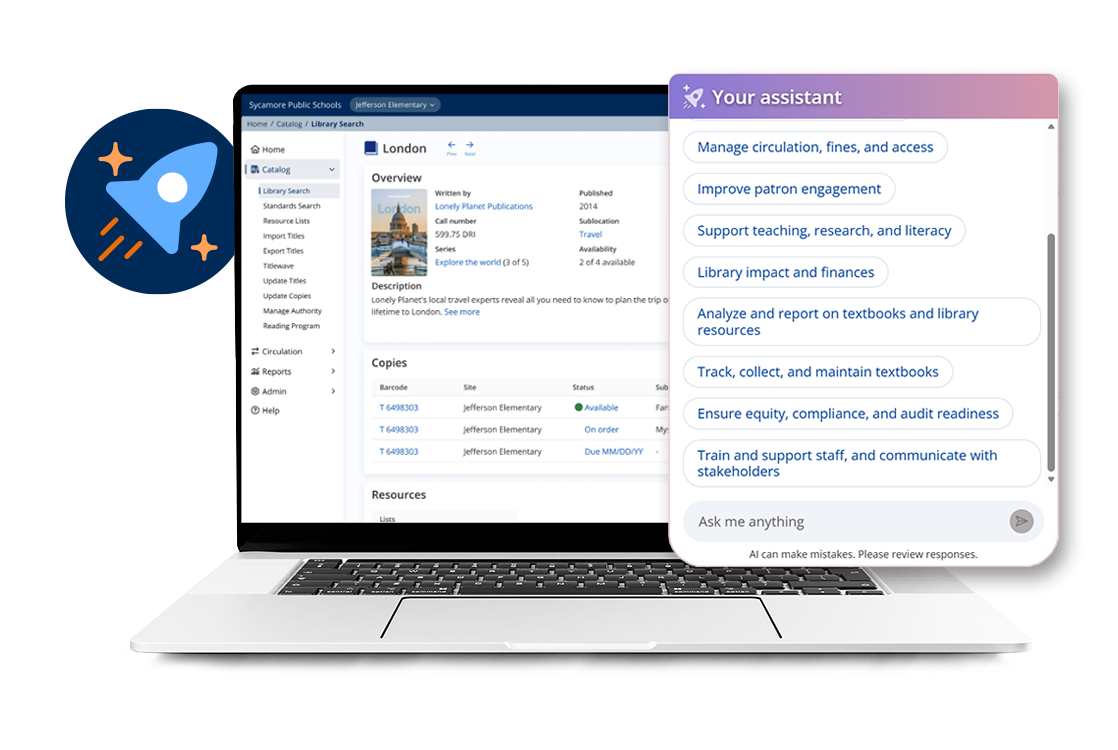 US-based, cloud-hosted Follett Destiny® Library Manager users can leverage the embedded Library AI Assistant to get quick answers without leaving the system they know.
Ask a question in everyday language, review the response, and move more quickly to your next task. A recent analysis of more than 6,000 prompt instances shows that librarians are already using the assistant most often for circulation, catalog lookups, reporting, collection analysis, and student engagement.
Here are some prompts you can try right away.
Start with Circulation and Analytics Prompts
- Compare circulation statistics for the past three years.
- How many books have I circulated since [date], and how does that compare with the same period last year?
- Show circulation patterns that indicate what titles I should add.
- How do I send overdue notices to students, patrons, or parents?
- How do I change due dates, loan periods, or renewal settings for a group of items?
- How do I mark copies lost or found, and adjust or forgive fines?
These prompts can help you answer routine questions, identify trends, and connect circulation data to collection decisions.
Analyze Collection Health and Weeding Needs with These Prompts
- Analyze my collection health and give me an overall grade, strengths, weaknesses, and an improvement plan.
- Identify titles to consider weeding based on age and circulation.
- Show a breakdown of books by publication decade.
- Help me plan a weeding project.
- Show circulation patterns that indicate collection gaps or purchasing priorities.
Use the results as a starting point for professional review, not as a replacement for your collection expertise and district procedures.
Prompts to Help Find Answers About Your Catalog
- Do I have any of these titles in my catalog? Then paste or type a title list.
- How many books, titles, and copies are in my collection?
- How do I find and merge duplicate titles or authority records?
- How do I batch update call numbers or sublocations for a list of books?
- Break down my fiction collection by genre and suggest a practical organization scheme.
These questions can help you find information faster and keep catalog work moving.
Support Student Engagement and Reading with These Prompts
- How do I teach students to search Destiny Discover effectively for research and find reliable sources?
- Create a Library Manager scavenger hunt for [grade level].
- How can I build a culture of independent reading in my school library?
- Create a themed or seasonal reading list or display from my collection.
- Suggest books for [grade level], [reading level], or [student interest].
The Library AI Assistant can help you move from a blank page to a starting point for instruction, displays, and reader’s advisory.

Make the Prompts Work Harder for You
Add details when you have them. For example, specify a date range, grade level, genre, school, or collection area.
You can also ask a follow-up question to refine the response:
- “Now show me the results for only the middle school collection.”
- “Organize those titles by publication decade.”
- “Turn this into a short action plan.”
Your District Stays in Control
The Library AI Assistant is optional to use, and it must be enabled before you can access it. Your district decides whether to enable it, which schools and roles can use it, and how it fits into local workflows.
District-wide access is now available for district roles, allowing authorized users to ask questions across one or more sites from District View, a site, or both, wherever their permissions allow.
District administrators can also upload approved policies and procedures so responses reflect local guidance. Examples include collection development, weeding, circulation, inventory, and communication procedures.
The Library AI Assistant does not search patron data. It is designed to help with catalog information, circulation trends, inventory, workflows, and district policies while keeping librarians and district administrators in control.
Try Your First Prompt
Start with the question that usually takes the most time to answer. Ask the Library AI Assistant to compare circulation, analyze collection health, find titles in your catalog, or create a student activity.
A clear question can be the fastest path from data to a useful next step.
The Library AI Assistant is currently available only to eligible US-based customers with cloud-hosted Follett Software environments.
Learn more
- Destiny Training: Library AI Assistant in Action
- Follett Software AI Now Included Across Supported K–12 Products
Related Product

Related Resources
K-12 Facility Scheduling Workflows
Blogs
What Is K-12 IT Asset Management?
Blogs
How to Run a K-12 Library with Limited Staff
Blogs